
Overview
This technical bulletin explains the microprocessor configuration requirements for Carrier® Xarios® 500 and Xarios® 600 transport refrigeration units.
The updated microprocessor system introduces improved configuration flexibility and additional functionality, including support for liquid injection valves, heating options, and suction bypass valves.
Technicians commissioning or replacing microprocessors on these units must ensure that the system configuration matches the installed hardware options to avoid operational faults or alarm conditions.
Microprocessor Compatibility and Replacement
Carrier® Xarios® 500 and Xarios® 600 units use two versions of the microprocessor platform.
The microprocessor 12-00716-xx is now supplied in two configurations:
-
Standard Version (Blue Sticker)
-
Full Option Version (Yellow Sticker)
The full-option microprocessor is supplied for both standard and full-option replacements. When installing the replacement unit, the correct configuration must be applied during commissioning to match the system specification.
Myriad replacement parts
The following Myriad parts support Xarios® 500 / 600 microprocessor replacement:
|
Xarios® Model |
Microprocessor No. |
Replacement Part No. |
Myriad Part No. |
| Xarios 500/600 | 12-00526-xx | 12-00526-xx | MPN0514A |
| Xarios 500/600 | 12-00716-xx | 12-00716-xx | MPN0514B |
MPN0514A – Microprocessor (Standard Version)
Designed as a replacement microprocessor for Carrier® Xarios® 500 / 600 systems.
MPN0514B – Microprocessor (Full Option Version)
Supports additional system functionality including liquid injection, heating options and bypass valve configurations.
Key Feature Differences
Standard vs Full Option Microprocessor
The two microprocessor versions support different hardware features.
Standard version supports:
-
Basic refrigeration system configuration
-
Standard control functions
Full option version supports:
-
Liquid injection valve functionality
-
Water heating option (hot water pump and valve)
-
Suction bypass valve (Xarios® 600 only)
When installing the full option microprocessor on a standard system, correct configuration must be applied to match the installed equipment.
Configuration During Commissioning
Correct configuration is required when commissioning or replacing a microprocessor on Carrier® Xarios® 500 / 600 units.
These configuration requirements apply to units with serial number PC723318 and later.
Technicians must ensure the Pd function is configured correctly using the cab control interface.
Required configuration
The Pd function must be set to “PdOn” on the Cab Command unit during commissioning.
Important Compatibility Notes
Incorrect configuration may trigger system alarms depending on the installed hardware.
Units produced before serial number PC723318
-
Systems without a liquid valve may trigger Alarm A29 if the Pd function is set to PdOn.
Units produced after serial number PC723318
-
Units equipped with a liquid valve will not activate the valve if the setting is PdOf.
-
This condition may trigger Alarm A01.
Correct system configuration ensures the microprocessor communicates properly with the installed hardware components.
Cab Control Unit Configuration Procedure
To configure the system using the Cab Control unit:
-
Press On
-
Press the Configuration button located on the back of the Cab Control unit
-
Use the Set key and + / – buttons to navigate configuration settings
-
Press Off / On to save changes
A small tool such as a paperclip may be required to access the configuration button on the rear of the control unit.
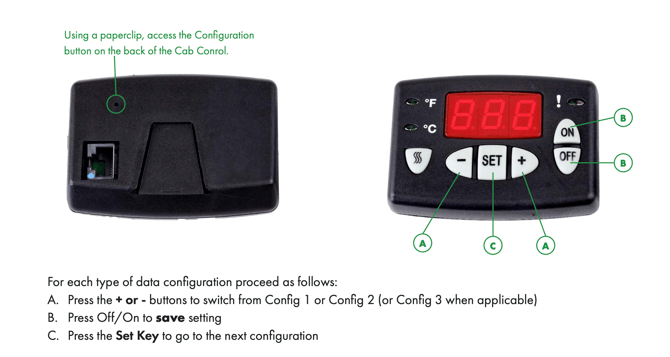
If no key is pressed for five seconds, the display will automatically return to box temperature mode.
Configuration Options
During installation or commissioning, several system parameters may need to be configured depending on the unit specification.
Typical configuration settings include:
-
Temperature display unit (°C / °F)
-
System voltage (12V or 24V)
-
Number of evaporator fans
-
Fan speed configuration
-
Evaporator temperature operating mode
-
Road heating kit configuration
These settings allow the microprocessor to match the installed refrigeration system hardware.
Download the Full Technical Bulletin
For full configuration tables, diagrams and commissioning instructions, download the original bulletin.
Download PDF:
Carrier® Xarios® 500 / 600 Microprocessor Configuration Technical Bulletin
Need Assistance?
If you require help identifying the correct replacement microprocessor or configuring a Carrier® Xarios® 500 / 600 unit, the Myriad team can assist with compatible parts and technical guidance.
Visit www.myriadparts.com or contact our team for support.